Koala Sampler
- 4.8
- Rating
- 100.00K
- Installs
- $4.99
- Price

 Analysis by App-foxy
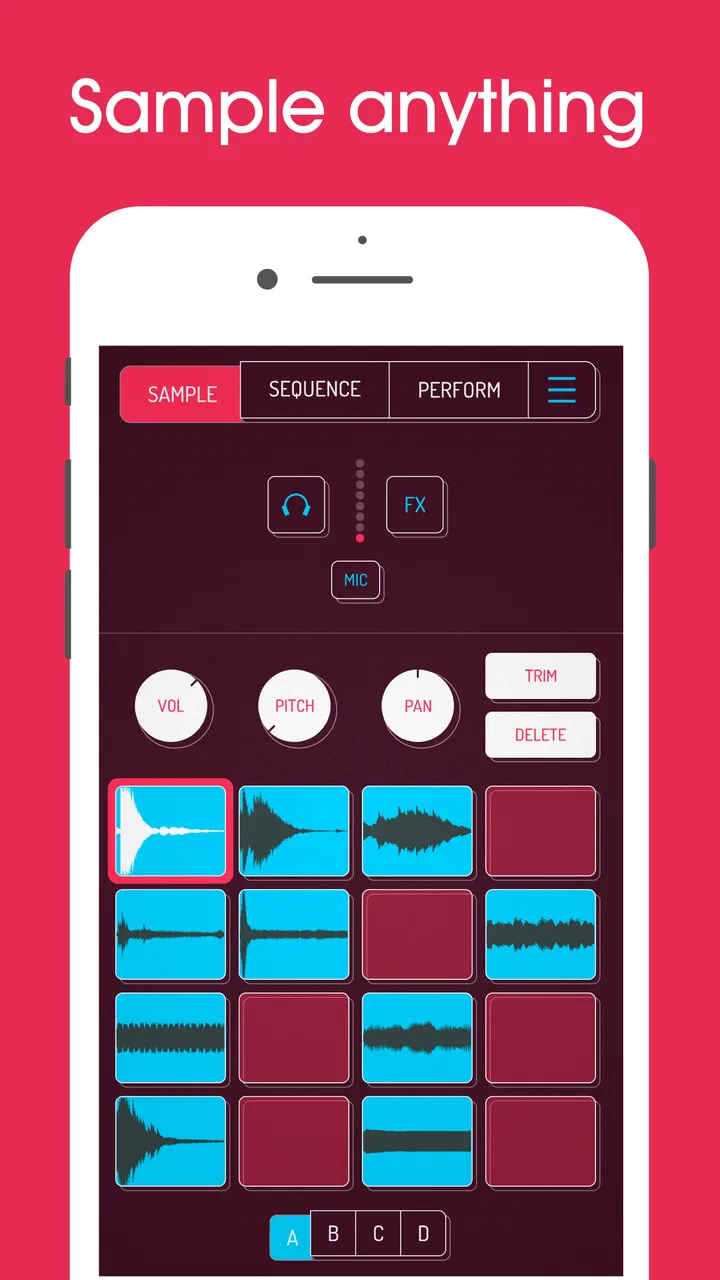
I approached Koala Sampler as a pocket music-making tool rather than a miniature recording studio, and that distinction matters. It is an Android and iOS app from elf audio in the Music & Audio category, built around the simple pleasure of turning sounds into playable material. I found the appeal quickly: a short noise, a voice fragment, a beat from the kitchen, or a melody from another source can become something I can tap, rearrange, and perform.
The app costs $4.99, carries an Everyone age rating, and has reached over 100K installs. Its average rating is 4.8 from around 3.2K ratings, with roughly 523 written reviews. Those figures suggest a strong reception, but they do not tell you whether its compact, touch-first approach suits your hands, hearing, workflow, or expectations. After using it, my view is that this is a focused instrument for experimentation, not a replacement for every traditional music app.
How the interface feels to read and navigate
The strongest part of the experience is how quickly the app gets me from an idea to a playable sound. Instead of presenting a large project-management interface, it centers the act of sampling and triggering. That makes the first session feel less intimidating than opening a full digital audio workstation, where tracks, buses, plug-ins, and menus can compete for attention.
You May Also Like

 Pandora - Music & Podcasts
Pandora’s Music Is Easy to Start, but Harder to Recover
Pandora’s strength is its low-effort path from a seed to a station. Its weak spot is how much confidence it asks you to place in connection, setup, and quiet recovery.

 AccuWeather: Weather Radar
AccuWeather Review: A Quick, Clear Forecast for Everyday Decisions
For everyday plans, the best forecast is the one you can understand quickly. AccuWeather makes rain timing, radar, and local conditions easy to act on, with a few trade-offs.

 Hill Climb Racing
Why Hill Climb Racing Still Turns Crashes Into One More Run
A tiny car, a bumpy hill and one more upgrade: Hill Climb Racing keeps resurfacing because its simple chaos makes every near-miss feel personal.

 AliExpress - Shopping App
AliExpress Makes Global Shopping Feel Personal, but Shoppers Bear the Risk
AliExpress turns a global marketplace into a pocket-sized discovery engine. Its reach is useful, its shopping loop compelling, and its trade-offs easy to miss.

 Lords Mobile: Kingdom Wars
Lords Mobile Is a Kingdom-Building Routine, Not a Quick Match
A case-by-case verdict on the building, battles, device demands, and social commitments that make Lords Mobile rewarding for some players and exhausting for others.

 PDF Scanner app - TapScanner
TapScanner Makes Paperwork Easier to Capture, Check, and Share
TapScanner makes scanning with a phone feel less like a rescue operation and more like a dependable step in getting work done. Its capture tools are useful, though not flawless.
More From Our News Desk
View All News


That simplicity also creates a particular kind of navigation challenge. A sampler is visually compact because many actions share one screen or sit behind touch controls. I sometimes had to pause and remember which gesture or control affected the sample itself and which changed the way it played. For a confident touchscreen user, this becomes familiar with practice. For someone who prefers clearly labeled, sequential menus, the learning curve can feel less obvious than the app’s friendly appearance suggests.
I would not describe the interface as difficult, but I would describe it as tactile. The app rewards looking at the screen while using it. That is excellent when I am shaping a sound, tapping a rhythm, or exploring a pattern. It is less comfortable when I want to work entirely through a keyboard, switch access method, or spoken guidance. The design feels made for direct contact with pads and controls, so users who rely on non-touch navigation should test the interaction carefully before committing.
Text and controls are generally easier to understand when I use the app in a focused session rather than while moving around. The visual density is manageable, yet a small display can make precise edits feel cramped, especially when I am trying to select a tiny portion of a recording or make a subtle timing adjustment. A larger phone or tablet gives the controls more breathing room. That is not a reason to avoid the app, but it changes how comfortable detailed work feels.
Learning the sampler without losing the creative flow
My advice for a first session is to begin with one short sound and learn what happens when I tap, hold, trim, and replay it before importing or capturing a large collection. This reduces the number of unknowns at once. Once the basic relationship between a sample and its pad makes sense, experimenting becomes much more natural.
A useful habit is to make a tiny practice set for each project instead of filling the available space immediately. I can group sounds by purpose: a kick-like hit, a percussive object, a vocal phrase, and a sustained tone. This makes the visual layout easier to scan and reduces the mental effort of searching while performing. It also helps users who become overwhelmed by too many simultaneous choices.
The app’s compact design is especially good for people who think in fragments. I do not need a complete song before starting. I can capture a sound, test its rhythm, and decide whether it deserves more attention. That low-commitment workflow is one of the reasons I would recommend it to beginners who want to understand sampling through doing rather than reading about audio theory first.
Touch, sound, and different ways of using the app
Koala Sampler is naturally appealing to users who enjoy tapping and manipulating sounds directly. The physical relationship between finger and pad makes rhythm feel immediate, and it encourages playful mistakes. I can use one hand to trigger material while using the other to adjust a control, although precision depends on the size of the device and how quickly I am working.
That touch-first strength can become a barrier for people with limited reach, tremor, reduced fine-motor control, or difficulty maintaining a steady press. Rapid triggering and small targets may require more effort than they would in a conventional desktop music program. I found that slowing down is often enough for setup and editing, but live performance demands more accuracy. If your movements are unpredictable, the app may be more comfortable as a sound-design tool than as a fast performance instrument.
A practical workaround is to prepare the arrangement in advance and reserve live tapping for a few reliable sounds. I get better results when I do not expect every part of a performance to depend on split-second finger placement. Building a simple bank of clearly separated sounds lets me participate musically without turning the whole session into a test of speed and precision.
Sound sensitivity is another important consideration. Sampling invites repetition, sudden transients, and layered playback, so the experience can become intense when several bright or loud sounds are triggered together. I recommend starting at a low listening level and checking each sample before combining it with others. This is particularly helpful for people who are sensitive to abrupt sounds or who use headphones for long periods.
The app can also work well for users who communicate or create through voice, found sound, and short gestures rather than formal notation. I enjoyed making material from ordinary noises because the process does not require me to begin with a melody or chord progression. Someone who finds traditional instruments physically demanding may appreciate the expressive possibilities of manipulating recorded sound, though the touch demands remain relevant.
Why sample preparation matters more than it first appears
One of the less obvious lessons is that the quality of the source material affects accessibility as much as musical quality. A clean, distinct recording is easier to identify, trigger, and adjust than a noisy clip with a long silent lead-in. Before building a set, I try to remove uncertainty: I use sounds with clear starts, avoid placing similar noises beside one another, and keep the number of active choices manageable.
This is also a good way to support users who have difficulty distinguishing dense layers by ear. If every pad has a noticeably different role, I can recognize it from context and sound rather than relying on tiny visual differences. The result is less cognitive load during a performance and fewer accidental triggers.
For people with hearing loss, the app’s value will depend on the kind of work they want to do. Sampling can still be satisfying when the goal is arrangement, rhythm, or visual experimentation, but purely audio-based decisions may be harder without dependable access to the sound. I would treat a good monitoring setup and a quiet environment as part of the workflow, not as optional extras. The app itself cannot remove the need to evaluate audio somehow.
Using it in real situations
The most convincing everyday scenario for me is a short creative break. I might record the click of a pen, a cupboard door, and a spoken phrase, then turn those fragments into a rough rhythmic sketch before returning to work. The session does not need a studio, a long setup, or a complete plan. That makes the app feel genuinely portable rather than merely small.
It is also useful for musicians who want to capture an idea before it disappears. A traditional multitrack recorder can be better when I already know I need several instruments, careful editing, and a formal arrangement. Koala Sampler is better when the idea begins as texture, rhythm, or a surprising sound. The difference is not just convenience; it changes the kind of music I am likely to make.
In a shared space, I would be more deliberate. Recording a sound in a quiet room is easier than trying to separate it from conversation, traffic, or appliances. Headphones can help me monitor playback without disturbing others, but they do not solve every environmental problem. If I need reliable recording in unpredictable surroundings, a dedicated microphone or a more conventional audio setup may be the wiser choice.
For teaching, the app has potential because it makes abstract ideas tangible. A student can hear how changing a short sound changes its role in a rhythm, or how repetition creates a pattern. The teacher still needs to provide structure, because the freedom to experiment can become distracting. A prepared exercise with a limited set of sounds is more approachable than asking a beginner to explore everything at once.
It can also suit collaborative work, but I would not confuse collaboration with simultaneous multi-user editing. The practical approach is to pass a device around, perform a prepared set, or exchange the resulting audio through whatever broader workflow the user already has. If your priority is live remote collaboration, shared projects, or detailed team version control, a full production platform is likely a better fit.
Where the app is strong, and where it asks more from you
Compared with a standard voice recorder, this app is far more creative because the captured sound is treated as playable musical material rather than a file that simply sits in a list. Compared with a full digital audio workstation, it is quicker to enter and less demanding during the first experiment. I can get to a rough groove without learning an entire production environment.
The trade-off is depth and familiarity. A workstation may offer a clearer timeline, more conventional editing, and better support for long-form arrangements. A traditional drum machine may provide more predictable controls for users who want fixed rhythms. A hardware sampler may feel more satisfying to someone who needs physical knobs, larger controls, or a tactile surface that does not depend on a glass screen.
I also noticed that the app’s flexibility can encourage unfinished ideas. It is easy to make an entertaining loop and keep tweaking it without deciding what the piece is supposed to become. My solution is to set a small goal before opening the app: create a thirty-second rhythm, build a texture from three sounds, or make one usable transition. That turns open-ended play into progress.
The current version is 2.0.3, and the app has been available since March 26, 2020. Those details matter less than the practical question of whether the interaction style suits you today, but they do place the app in the category of an established creative tool rather than a brand-new experiment. The developer is elf audio, and the product’s identity remains tightly focused on sampling instead of trying to become an all-purpose music suite.
Costs and the decision to commit
The upfront price is $4.99, with optional in-app purchases ranging from $2.99 to $4.99 per item. I would consider the initial purchase reasonable for someone who already knows they enjoy making beats or manipulating recordings. It is less compelling for a casual listener who only wants to play music, because the value comes from active creation rather than passive use.
The age rating is Everyone, which fits the general creative purpose of the app. Still, age suitability and ease of use are different questions. A child may enjoy tapping sounds immediately, while a younger user may need help managing volume, choosing recordings, and understanding that a playful sample can become repetitive or unexpectedly loud.
The minimum operating system requirement is 8.1, so compatibility should be checked against the device before purchase. More importantly, older or smaller hardware may make precise touch work less comfortable even when the operating system is supported. A supported device is not automatically an ideal device for fast sampling and performance.
My inclusive verdict after living with the workflow
I recommend Koala Sampler to curious beginners, beat-makers, sound collectors, teachers, and musicians who want a fast route from everyday audio to a playable idea. Its best quality is not simply that it fits in a phone; it is that the small format encourages me to notice sounds and turn them into material before overthinking the process.
I would be more cautious if you need large, highly readable controls, extensive keyboard navigation, hands-free operation, a formal timeline, or a predictable hardware-like interface. Users with motor or sensory needs may find it rewarding with careful preparation, lower volume, a larger screen, and a limited sound set, but the app does not remove the physical and auditory demands of touch-based sampling.
The most inclusive way to use it is to adapt the workflow, not to force yourself to perform it at maximum speed. Prepare samples with clear identities, keep sessions short when concentration or sound sensitivity is an issue, use a device that gives your fingers room, and treat live triggering as optional rather than mandatory. Those choices make the experience more welcoming without pretending that one interface can suit every creator.
For me, this is an unusually approachable sampler with enough character to remain interesting after the first novelty wears off. It is not the right answer for every music-making problem, and its compact touch controls can frustrate users who need more space or alternative input methods. But if you want to turn small recordings into rhythms, textures, and quick musical sketches, I think it earns its place as a focused creative companion.
FAQs for Koala Sampler
01What is Koala Sampler, and what can you do with it?
Koala Sampler is a mobile music-making app designed for sampling, beat production, and quick musical experimentation. You can record sounds through your device’s microphone, import audio files, chop samples, play them from a pad grid, add effects, sequence patterns, and arrange complete tracks. Its interface is approachable for beginners, while features such as resampling and automation give experienced producers plenty of room to create.
02Is Koala Sampler suitable for beginners without music production experience?
Yes. Koala Sampler is one of the more accessible music apps for newcomers because it focuses on pads, visual waveforms, and straightforward controls instead of complicated menus. You can start by recording everyday sounds, tapping rhythms, and building short loops. However, learning how sampling, sequencing, effects, and song arrangement work will still take practice if you want to produce polished, structured tracks.
03Can Koala Sampler record sounds and import samples from other sources?
Koala Sampler supports recording sounds directly through a compatible device microphone, making it easy to capture vocals, instruments, or sounds around you. You can also work with audio imported from supported locations and services, depending on your device and operating system. File access, sharing permissions, and available import options may differ between Android and iOS, so checking the current store description is recommended.
04Does Koala Sampler include effects, sequencing, and full song-making tools?
The app offers much more than a basic sample pad. You can trim and edit recordings, tune samples, apply effects, create patterns, arrange sections, and resample processed audio for further manipulation. It is capable of producing complete beats and songs, although its workflow is intentionally focused on sampling and mobile performance. Producers seeking advanced recording, mixing, or instrument features may still prefer a larger digital audio workstation.
05Is Koala Sampler free, and are there additional purchases or device requirements?
Koala Sampler is generally offered as a paid app, though pricing can vary by platform, region, promotions, and the version available in the store. Some optional features or expansion content may require additional purchases, so review the current listing before downloading. A reasonably modern Android or iOS device is recommended, particularly when using many effects, lengthy samples, or demanding projects, and headphones can help prevent recording feedback.
Pros
- Intuitive touch interface makes chopping and triggering samples quick.
- Supports recording directly from the microphone or connected audio sources.
- Compact workflow encourages fast beat-making without unnecessary menus.
- Includes useful effects for shaping drums
- vocals
- and melodic samples.
- Works well for sketching ideas while traveling or away from a computer.
Cons
- The small interface can feel cramped on phones with smaller screens.
- Advanced sample editing is more limited than in full desktop samplers.
- Some features may require extra purchases or compatible external gear.
- Large sample libraries can consume significant device storage space.
- Exporting complex projects may require additional steps in another music app.

Koala Sampler
Gallery